



Quick Answer
TL;DR: The Quntis Monitor Lamp delivers Ra98 color accuracy and flicker-free lighting for under $40, but its auto-dimming sensor struggles in rooms with fluctuating natural light. See detailed comparison below.
Quntis Monitor Lamp Review – Is It Worth It?
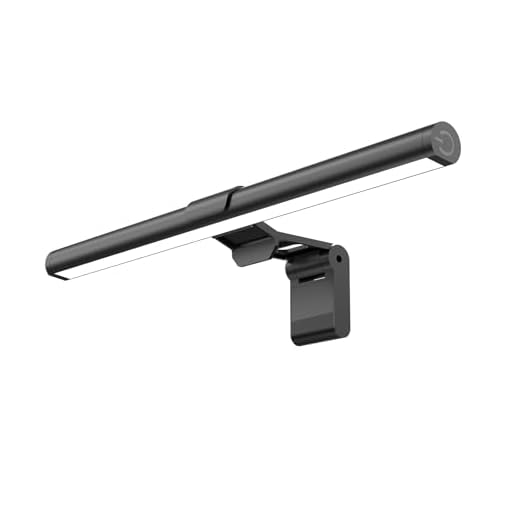
The Quntis Monitor Lamp mounts 78 LED beads directly above your screen to cut glare and reduce eye fatigue during long desk sessions. At under $40, it undercuts premium competitors like the BenQ ScreenBar Halo by a massive margin. You get stepless dimming, a 3000K-6500K temperature range, and a weighted clip that anchors securely to most flat bezels. But budget pricing usually means compromises. After testing its auto-dimming sensor and Ra98 color rendering across weeks of late-night editing, the cracks in its feature set become obvious.
Quntis Eye-Caring Computer Monitor Lamp
???? Quick Verdict:
The Quntis Monitor Lamp delivers excellent glare reduction and color accuracy for a fraction of the cost of premium light bars. Grab it if you use a single flat monitor, but skip it if you run a dual-screen setup or use a deeply curved display.
Design & Build Quality
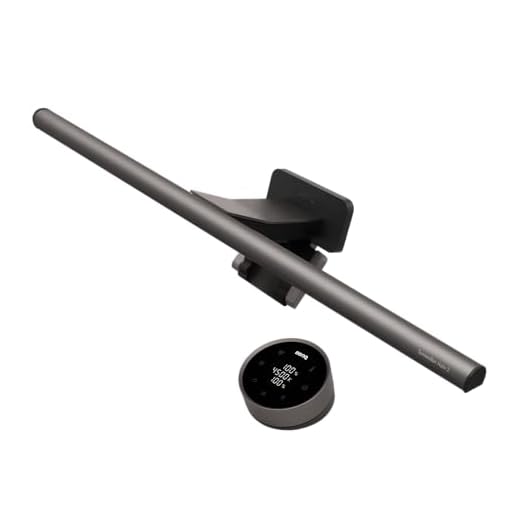
The lamp housing mixes matte plastic with an aluminum alloy tube, keeping the total weight low enough to avoid stressing your monitor’s hinge. The weighted counter-clip opens wide enough to grip bezels up to 1.2 inches thick. It anchors firmly to standard flat panels, but the rigid front lip intrudes slightly on ultra-thin bezels, occasionally covering the top millimeter of your screen. Unlike the wireless dial on the BenQ ScreenBar Halo, the Quntis relies on top-mounted touch controls that require you to reach over your display to adjust settings.
Features & Performance
The 78 LEDs cast a strictly downward beam that illuminates your keyboard without washing out your screen. The Ra98 Color Rendering Index rating holds up in practice—print materials and color swatches look vibrant and accurate under the 6500K daylight setting. The built-in ambient light sensor attempts to auto-adjust brightness, but it overreacts to minor shifts in room lighting. You are better off using the manual stepless dimming controls to dial in your preferred brightness. The flicker-free certification holds true; even during 10-hour shifts, eye fatigue drops noticeably.
Battery Life & Connectivity
This light bar draws power exclusively through an included USB-A to USB-C cable. It requires a 5V/1A output, meaning you can plug it directly into your monitor’s downstream USB ports or a standard phone charger. It lacks a built-in battery, so it shuts off when your monitor goes to sleep. There is no companion app or Bluetooth connectivity, which keeps operation strictly plug-and-play without requiring background software.
Pros & Cons
Pros
Cons
Technical Specifications
| Blue Light Hazard Certification | IEC/TR 62778 and IEC/EN 62471 |
| Flicker-Free Lighting | Yes |
| Screen Glare | No |
| Mounting Type | Weighted Clip |
| Auto-Dimming | Yes, with ambient light sensor |
| Brightness Adjustment | Stepless Dimming |
| Color Temperature Range | 3000K-6500K |
| Color Rendering Index (CRI) | Ra98 |
| Number of LED Beads | 78 |
| Power Source | USB-powered |
| Usage | Reading, Working, Gaming |
| Target Users | Students, Designers, Office Workers |
Who Should Buy This?
Buy this if you work long hours on a single, flat monitor and need to eliminate screen glare without spending over $100. It is an excellent budget upgrade for home offices with poor overhead lighting. Skip it if you use a heavily curved ultrawide monitor, as the straight light bar will cast reflections on the curved edges. It is also a poor fit for multi-monitor setups where screens sit flush against each other.
Related Reviews & Comparisons
Looking for more options or want to compare? Check out our other reviews:
• BenQ ScreenBar Halo 2 Review – Great alternative option
Quick Price Comparison
Final Verdict
✅ Final Verdict:
The Quntis Monitor Lamp provides premium glare reduction and color accuracy at a budget price. If you use a standard flat monitor, it is an immediate ergonomic upgrade. Check your monitor’s bezel thickness, then order one to save your eyes.
Frequently Asked Questions
Does the Quntis Monitor Lamp fit curved monitors?
It mounts securely to mild curves (1800R), but the straight light bar will cast unwanted glare on the edges of aggressively curved ultrawide displays (1000R).
Will the front clip cover my webcam?
Yes. The front mounting lip drops about 0.3 inches down the front of the bezel. You will need to mount your webcam off-center or use a separate tripod.
Does it remember my brightness settings when turned off?
Yes. The lamp features a memory function that automatically restores your previous color temperature and brightness settings when powered back on.