You already know the problem with using your phone as a Pomodoro timer: you pick it up to start a 25-minute focus block, see three notifications, and suddenly you’ve lost 15 minutes to scrolling. I’ve tested dozens of digital wellness tools, and replacing your phone’s timer with a dedicated, physical desk gadget is the single highest-ROI change you can make for your attention span.
But the market is flooded with cheap plastic cubes that either require a master’s degree to program or break after a month. You don’t need a smart device; you need a tactile tool that removes friction. Whether you’re managing ADHD time blindness, grinding through 90-minute deep work sessions, or just trying to get through a stack of emails, the right physical timer makes starting the work the easiest part of your routine.
Top Picks
After auditing the real-world performance of these tools, here is exactly which timer deserves a spot on your desk.


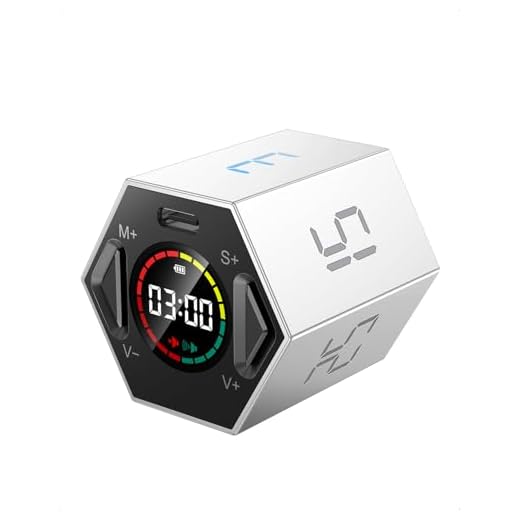
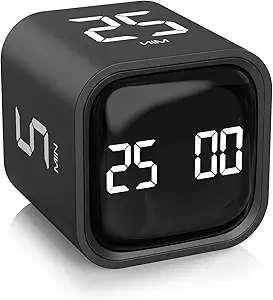


Ticktime Pomodoro Productivity Timer Cube
The Ticktime strips away all friction from the Pomodoro technique. Its built-in gyroscope lets you start a 25-minute focus session simply by flipping that number to face up.
Presets: 3, 5, 10, 15, 25, 30 minutes. Custom countdown: 1s to 99m 59s. Three alert modes: silent flash, vibrate, and sound.
Flipping it instantly triggers the timer, keeping your hands entirely off your phone. But while the presets are brilliant, dialing in a custom time requires tedious button presses that completely defeat the magic of the flip mechanism.
Verdict
Best Overall. Buy this if you want the absolute lowest friction way to execute classic 25-minute Pomodoro cycles without touching a screen.
Rotating Pomodoro Timer for Focused Work
This timer fixes the main limitation of more expensive cubes by including a 50-minute gravity-sensing face, catering directly to those who prefer longer work blocks.
Presets: 5, 10, 25, 50 minutes. Custom limits: 00-99m 59s. Volume levels: High (90-100dB), Low (70-80dB), and silent vibration.
The 50-minute preset is a godsend for deep writing or coding sessions. However, flipping the timer screen-down instantly resets it to zero, meaning if you knock it over by accident, you lose your current session progress completely.
Verdict
Best Premium Smart Timer. Buy this if you prefer working in 50-minute sprints and want a flip-to-start timer on a budget.
Professional Touch Control Speed Cube Timer
Endorsed by the World Cubing Association, the QIYI is built for hyper-accurate elapsed time tracking rather than counting down. It logs your work down to 0.001 seconds.
Accuracy: 0.001s. Memory: Stores last 3 records. Power: 2 AAA batteries (not included). Touch-activated with anti-slip feet.
Slapping your hands onto the touch plates to start and stop a sprint task feels incredibly satisfying and gamifies your workflow. The massive flaw for productivity is that it only counts up; it has zero countdown functionality.
Verdict
Most Versatile Cube Timer. Buy this if you want to gamify repetitive administrative tasks by racing the clock to complete them.
2-Pack Digital Kitchen Timer with Magnetic Backing
A barebones, two-pack digital timer that costs less than a latte. It uses a massive display and a loud buzzer to keep you on schedule.
Max time: 99m 59s. Alert: Auto-stops after 30 seconds. Mounting: Magnetic back, retractable stand, hook. Memory function via ST/SP button.
The memory setting is the savior here—press ST/SP once and it recalls your last duration, saving you from mashing the minute button 25 times. Unfortunately, the alarm is aggressively loud and completely lacks a volume control or mute option.
Verdict
Best Budget Option. Buy this if you work from home and just need a cheap, loud, dedicated timer for consistent, repeated intervals.
Time Timer 12-Inch 60-Minute Visual Timer
The 12-inch Time Timer is the gold standard for combating time blindness. The massive red disk physically disappears as time elapses, giving your brain a spatial representation of remaining time.
Dimensions: 12 x 1.65 x 12 inches. Max time: 60 minutes. Power: 2 AA batteries. Features: Dry-erase activity card, optional audible alert.
Looking up and seeing exactly a quarter of the red wedge left keeps you on task far better than reading ’15:00′ on a screen. Its hard limitation is the 60-minute maximum capacity, making it useless for tracking multi-hour deep work sessions.
Verdict
Best Visual Timer for ADHD & Deep Work. Buy this if you struggle with ADHD or time blindness and need a massive, un-ignorable visual representation of passing time.
Visual Digital Rechargeable Timer with Color Display
This timer merges digital precision with visual tracking, using a slick wheel design and a dual-color LED progress bar to visualize hours and minutes separately.
Display: 3.15-inch LED. Max time: 11h 59m. Alerts: Loud, Low, Mute/flash. Visuals: Yellow for hours, red for minutes.
The wheel control is vastly superior to mashing buttons, letting you dial in 90 minutes in a second. But if you use ECO mode to save battery, the screen dims entirely after 30 seconds, completely defeating the purpose of a visual progress bar.
Verdict
Most Stylish Desk Gadget. Buy this if you want the visual progress of an analog timer but need to track sessions lasting longer than an hour.
SuLiao Multicolor Hourglass Sand Timer Set
For absolute screen-free focus, this five-piece hourglass set provides a completely silent, analog commitment device made of durable borosilicate glass.
Intervals: 1m (blue), 3m (green), 5m (orange), 10m (purple), 30m (pink). Materials: BPA/lead-free ABS plastic exterior, borosilicate glass.
Flipping the 30-minute pink hourglass acts as a contract with yourself—there’s no pausing, skipping, or checking exact remaining minutes. The glaring omission is a 25-minute timer; the jump straight from 10 to 30 minutes misses the classic Pomodoro sweet spot.
Verdict
Best for Silent, Screen-Free Focus. Buy this if you want an aesthetic, completely analog commitment device to keep you from checking the exact time.
Buying Guide
The Friction Factor
The primary reason phone timers fail as productivity tools is the friction required to start them. Unlocking a screen, opening an app, and typing in digits exposes you to distraction. This is why flip-timers like the Ticktime and Rotating Pomodoro are incredibly effective. By tethering the physical action of flipping a cube to the start of a timer, you bypass the digital friction entirely. Look for devices that allow you to initiate a work block in less than two seconds without looking at a screen.
Aligning Presets
If you buy a timer with preset intervals, ensure those numbers match your actual workflow. The classic Pomodoro technique dictates 25 minutes of work and 5 minutes of rest, which most cubes accommodate. However, if you are a writer, programmer, or designer engaging in deep work, 25 minutes is often too short. In that case, prioritize a tool that features 50-minute or 60-minute presets, or one with a dial that allows rapid custom entries, rather than one that forces you to mash a button 45 times.
Combating Time Blindness
For individuals with ADHD or heavy time blindness, seeing the number ’14:20′ doesn’t effectively communicate how much time is left. You need spatial representation. Visual timers use disappearing colored disks or LED progress bars to show time as a volume that shrinks. A massive 12-inch analog wedge disappearing from your peripheral vision creates a sense of urgency and awareness that digital digits simply cannot replicate, keeping you tethered to the reality of the passing hour.
Alert Environments
Never buy a focus timer without confirming its alert options fit your workspace. A 100-decibel kitchen timer will make you the enemy of your open-plan office, and a faint beep will go unnoticed if you’re wearing noise-canceling headphones. If you work around others, you absolutely need a timer with a silent mode that uses either a flashing light or a physical vibration. If you work from home and frequently step away to grab coffee, prioritize something loud enough to hear in the next room.
Endurance and Power
Consider whether you want another device to plug in. Rechargeable lithium-ion timers are convenient, but they often utilize aggressive power-saving modes—like dimming their screens after 30 seconds—which ruins their utility as passive visual cues. AA or AAA battery-operated tools typically stay ‘always on’ and can run for months without intervention. If you opt for an analog sand timer, you eliminate power anxiety entirely, at the cost of being unable to pause your sessions.
Frequently Asked Questions
Conclusion
Stop relying on the same device that distracts you to keep you focused. If you want textbook Pomodoro cycles, grab the Ticktime Cube. If you need visual accountability for time blindness, mount the 12-inch Time Timer on your desk. Pick the one that fits your workflow and get back to work.